Installation#
The alphagenome package is a lightweight Python client for the hosted
AlphaGenome models and the AlphaGenome Atlas. It runs on Linux, macOS, and
Windows, and no local GPU is required.
Model predictions and Atlas queries both need a free AlphaGenome API key.
Install the package#
Install the latest release from PyPI inside a virtual environment:
python3 -m venv .venv
source .venv/bin/activate
pip install alphagenome
uv venv
source .venv/bin/activate
uv pip install alphagenome
Or add directly to an existing uv project:
uv add alphagenome
conda create -n alphagenome python -y
conda activate alphagenome
pip install alphagenome
Clone the GitHub repository for an editable install:
git clone https://github.com/google-deepmind/alphagenome.git
cd alphagenome
pip install -e .
To pull upstream changes later:
git pull
pip install -e .
Google Colab#
Every tutorial notebook starts with an install cell that installs alphagenome
(and any extra packages that notebook needs) in your Colab runtime:
! pip install alphagenome
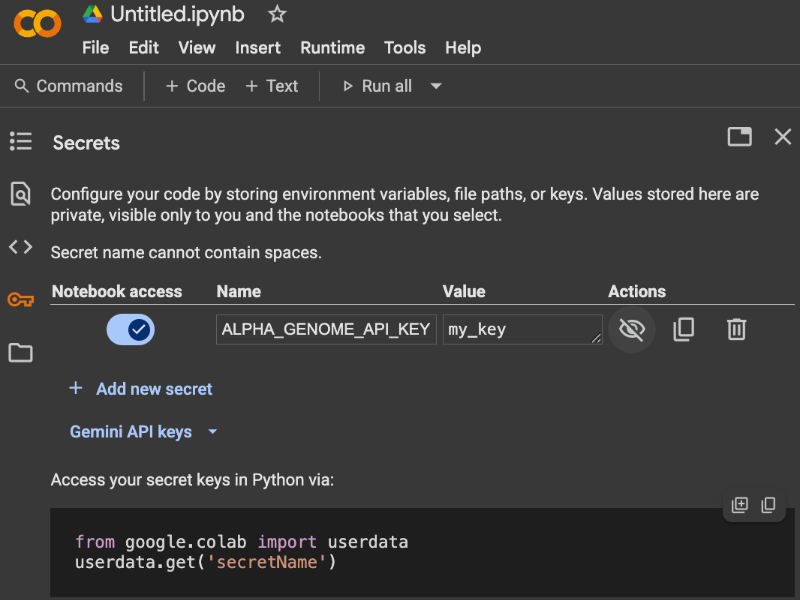
Add API key to secrets#
To authenticate from Google Colab notebooks without pasting your API key into code cells:
Open your Google Colab notebook and click the Secrets icon (key symbol) in the left sidebar.
Click + Add new secret and name it
ALPHA_GENOME_API_KEY.Paste your AlphaGenome API key into the Value field.
Toggle Notebook access on for the current notebook.
Local API key configuration#
When running Python scripts or Jupyter notebooks locally, export
ALPHA_GENOME_API_KEY in your shell environment (or add it to ~/.zshrc /
~/.bashrc):
export ALPHA_GENOME_API_KEY="YOUR_API_KEY"
colab_utils.get_api_key() reads this environment variable first and falls back
to Colab Secrets, so the same code runs locally and in Colab.
Verify your installation#
Confirm that the package is installed and your API key works:
from alphagenome import colab_utils
from alphagenome.models.v2 import dna_client

dna_model = dna_client.create(colab_utils.get_api_key())
print(len(dna_model.supported_conditions()), 'supported human conditions')
Next steps#
Continue to Getting started to choose a tool and walk through an AlphaGenome 2 workflow.
Follow the interactive Tutorials covering reference conditions, expression conditioning (
cell_conditioning=), and imputed tracks.